











WhatsApp +1 917 793 9264

Nixaiptv – Live TV matched to the broadband you already have

Nixaiptv: pick the picture quality your home connection can carry

One television in Full HD needs about 10 Mbps held steady; HD gets by on about 5 Mbps. Most ordinary home lines manage that, from a village copper line to a 4G router on the windowsill. Most of our 25,000+ channels come in more than one quality, so you match the picture to the connection, not the other way round. Try it for 24 hours on your own line first.

  • 24 hours free on your own connection
  • 7-day money back
  • Help on WhatsApp, 24/7
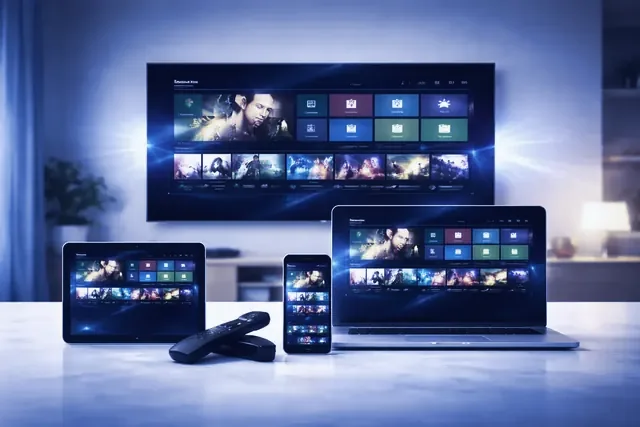
Nixaiptv playing on a television, a tablet, a laptop and a phone sharing one home connection
10 Mbps is about what one Full HD screen needs

Tell us your download speed and your device, and we will suggest the quality to start with.

Ask which quality fits

Refund within 7 days if it cannot be made to work on your device

Per screen

What one screen asks of your connection

Hold your connection up against these figures. They are per screen and approximate, and the speed column means speed kept up minute after minute, not a one-second peak.

Speed and data needed per screen at each Nixaiptv quality
QualityPictureSteady speed per screenData per hourUsually suits
HD720pabout 5 Mbpsabout 2 GBSlow DSL, weak 4G, a tight data cap
Full HD (FHD)1080pabout 10 Mbpsabout 4.5 GBMost DSL, cable, 4G and 5G lines
4K2160pabout 25 Mbpsabout 11 GBFiber, fast cable, strong 5G, a 4K set

Steady counts for more than fast

A line that holds 12 Mbps all evening plays Full HD better than one that tests at 40 and sags to 6 when the neighbors get home. The player keeps a few seconds in reserve; a dip longer than that pauses the picture.

Ping barely matters for television

Gamers watch the ping figure. A TV stream is buffered seconds ahead, so 60 ms on satellite or 4G looks the same on screen as 10 ms on fiber. Watch the download figure and how much it wanders.

Leave half as much again

Phones back up photos, consoles fetch updates, somebody joins a video call. Add roughly half again on top: one Full HD screen is comfortable on about 15 Mbps, one 4K screen on 35 to 40.

Changing quality means opening a different entry: most channels sit in the list more than once, each copy marked by its quality, so when one stalls you open the lower copy. The 4K page covers which connections can carry 4K and what to pick when yours cannot.

Several screens

Two or three screens on the same line

Each screen that is playing takes its own slice of the connection, so the line has to carry the total. Some common mixes, with the half-again margin worked in:

Connection speed needed for several screens playing at the same time
Playing at the same timeThe screens needLine to have, with margin
One Full HDabout 10 Mbpsabout 15 Mbps
Two Full HDabout 20 Mbpsabout 30 Mbps
Three HDabout 15 Mbpsabout 23 Mbps
One 4K and one HDabout 30 Mbpsabout 45 Mbps
Two Full HD and one HDabout 25 Mbpsabout 38 Mbps

Take a 20 Mbps line. Two Full HD screens together are tight there, yet one Full HD and one HD sit easily at about 15 Mbps. The answer is rarely a faster package: put the bedroom set or kitchen tablet on HD, where the difference is hard to spot.

The same sum chooses your plan. A connection on a Nixaiptv plan is one stream playing at a time, so order the number your line can feed together: two connections on a 30 Mbps line means two Full HD screens with room left for the phones.

Inside the house

Cable, Wi-Fi band and the room the router is in

A good connection can still reach the television thin. Most of the loss happens over the last few meters, and most of it can be put right without calling anyone.

Run a cable if you can

An Ethernet cable from router to TV box takes Wi-Fi out of the equation: no walls, no neighbors’ networks on the same channel. With the router a few meters away, a flat cable along the baseboard is the cheapest fix there is.

5 GHz close, 2.4 GHz far

5 GHz is quicker and less crowded but fades through brick and floors; 2.4 GHz is slower but carries further. Same room or next door: join 5 GHz. Two walls and a staircase away: 2.4 GHz often holds steadier.

Powerline or mesh for the far room

A powerline pair carries the network through the house wiring to a socket beside the television; a mesh unit halfway along relays the Wi-Fi instead. Either can rescue a weak room.

Measure in the room you watch in

Run the speed test on the TV device itself, at the hour you normally watch. A phone held next to the router tells you about the router, not about the sofa.

Your kind of line

Six ordinary connections, and the quality to start each one on

Nobody needs fiber to watch. Here is a starting point for each common setup; the trial then tells you whether to step up or down.

Copper DSL in a village

Often 8 to 20 Mbps, lower the further the house is from the street cabinet, but usually steady. One Full HD screen fits; when a second joins, put one on HD.

A 4G or 5G router by the window

Speed follows the signal and how busy the mast is, so it moves through the day. Start on Full HD, keep HD as the fallback, and read the SIM’s data terms before trying 4K.

One Wi-Fi shared by four people

The line may be quick; the trouble is four people drawing on it at once. Give the television Full HD, keep big downloads for later, and cable the TV if the router lives in the hallway.

A satellite internet dish

Services such as Starlink usually carry Full HD and often 4K; the higher ping makes no difference. Check the plan for a monthly data limit before settling on 4K.

A monthly data allowance

Here the GB column outranks the Mbps one. 100 GB is about 50 hours of HD, about 22 of Full HD or about 9 of 4K.

Fiber or fast cable

The easy case: 4K on the main television, Full HD everywhere else. Only the router’s position and the Wi-Fi band are left to check.

Who controls what

What we can change, and what only you or your provider can

On our side

  • Most channels in several qualities, so a slower connection still gets the channel.
  • Servers that are not the narrow point in the chain, running at 99.9% uptime.
  • Activation in under 15 minutes on WhatsApp, and a person there 24/7 to read your speed test and suggest a quality.
  • A 7-day money-back guarantee if the service will not work on your device and we cannot fix it.

On your side, and your internet provider’s

  • The line’s speed, how steady it stays, and what else is using it.
  • Where the router sits, which band the TV joins, and whether a cable can reach.
  • The data allowance on a mobile, satellite or capped plan.
  • Congestion inside the provider’s own network.

That split is the honest limit of any IPTV service. Nobody can make an 8 Mbps line carry 4K; we can make sure the channel also exists in a version that fits inside 8 Mbps.

The catalog at the far end of your connection

Live channels from 60+ countries, sport across the major leagues and a library of films and series, all in one player. The speed figures above apply to all of it: a film in Full HD draws about 10 Mbps, like a live channel.

Browse channels by country

25,000+Channels, live

60+Countries in the list

120,000+Films and series to play

99.9%Uptime on our end

Set up the device, then check the speed it actually gets

Guides for Roku, Samsung and LG televisions, Fire TV sticks, Apple and Android devices, MAG and Formuler boxes, and computers

Each guide covers one device, from installing a player to signing in; the setup hub lists them all. One network point first: a box or television with an Ethernet port can take a cable straight from the router, while a Wi-Fi-only stick does best on 5 GHz in the router’s room.

  • Amazon Fire TV Stick
  • Samsung Smart TV
  • Android TV
  • Apple TV and iPhone
  • MAG and Formuler box
  • Nvidia Shield
  • Android phone and tablet
  • IPTV Smarters Pro
  • Roku
  • Web player and M3U
  • LG Smart TV
  • Windows PC and Mac
Prices in USD

Plans by term and by streams playing at once

Choose the number of connections first, using the screen sums above, then the length. One connection for 12 months costs $69 up front; the same year paid month by month would come to $180.

1 Month

$ 15 / 1 month

One payment, nothing renews

  • 25,000+ live channels
  • 120,000+ films and series on demand
  • 4K, FHD or HD, picked to suit your line
  • Program guide (EPG) and catch-up
  • Runs on TVs, sticks, boxes, phones and PCs
  • WhatsApp help 24/7, speed questions included
  • 7 days to ask for your money back
Take this plan

3 Months

$ 29 / 3 months

$9.67 for each month covered

  • 25,000+ live channels
  • 120,000+ films and series on demand
  • 4K, FHD or HD, picked to suit your line
  • Program guide (EPG) and catch-up
  • Runs on TVs, sticks, boxes, phones and PCs
  • WhatsApp help 24/7, speed questions included
  • 7 days to ask for your money back
Take this plan

6 Months

Good middle ground

$ 45 / 6 months

$7.50 for each month covered

  • 25,000+ live channels
  • 120,000+ films and series on demand
  • 4K, FHD or HD, picked to suit your line
  • Program guide (EPG) and catch-up
  • Runs on TVs, sticks, boxes, phones and PCs
  • WhatsApp help 24/7, speed questions included
  • 7 days to ask for your money back
Take this plan

A connection means one screen playing, and each one takes its own share of your line: about 10 Mbps for Full HD, so two Full HD screens at once need about 20 Mbps between them. Leave roughly half as much again for the phones, updates and video calls sharing the line. Every card opens the same 25,000+ channels and 120,000+ films and series. Nothing renews by itself, the 7-day money-back applies to each term, and prices are in USD.

The pricing page lays every term and connection count out in one table. Still unsure about the line? Test it for 24 hours before choosing.

A household watching Nixaiptv on the living-room television over the home connection
Activation in under 15 minutesOnce the test is done, the order and the login come through the same WhatsApp thread.
Before you pay

Testing your line in one evening

  1. Speed-test the TV device

    Install a speed test app on the stick or box, or open one in the television’s browser, and note the download figure.

  2. Wait for the hour you normally watch

    Morning numbers flatter most connections. Test when you usually sit down, with the household online as normal.

  3. Play Full HD for twenty minutes

    If it runs clean, try the 4K copy; if it pauses to load, step down to HD.

  4. Add the second screen

    If two screens will run together, start both. Whatever holds then is the connection count to order.

Treat the 24-hour trial as a test of your line

The trial opens every channel, but its real job is one question: what does your connection carry, at your hour, on your screen? Ask for it from the device you will use. No card is taken.

Nothing to pay and no card. The button opens WhatsApp with these answers typed in; press send there and the test login comes back in that chat. Run it on the screen you will really use, at the hour you usually watch.

Frequently Asked Questions

Speed, data and Wi-Fi questions to settle first

Questions about connections, data and Wi-Fi. Ordering, payment and device questions are answered on the full FAQ page.

Will it work on a 15 Mbps line?

For one screen, usually yes: Full HD needs about 10 Mbps held steady, leaving a little room for phones. Two screens together are better in HD, at about 5 Mbps each. 4K, at about 25 Mbps, is beyond that line. The trial shows whether your 15 holds at the hour you watch.

How much of my data allowance does an evening use?

Per screen, about 2 GB an hour in HD, about 4.5 GB in Full HD and about 11 GB in 4K. Three hours of Full HD come to roughly 13.5 GB; the same evening in 4K, roughly 33 GB.

Does it work on 4G, 5G or satellite internet?

Yes. They usually have enough speed for Full HD, and a strong 5G or satellite connection often manages 4K; the higher ping does not affect watching. Check the monthly data allowance and whether the plan slows down after a set amount.

My speed test says 50 Mbps, so why does the picture still pause?

Most often the test ran on a phone next to the router, or at a quiet hour. The TV device two rooms away may see a fraction of that. Test on the television device at your normal hour; if the figure is low there, the fix is in the house (band, cable, router position), not the package.

Do I choose a quality when I order?

No. Every plan includes 4K, FHD and HD, and you switch between them in the channel list whenever you like. At order time you only choose the length and the number of connections.

What if it will not run on my line after I pay?

Message us on WhatsApp first; usually a lower quality or another Wi-Fi band solves it. If it still will not work on your device and we cannot fix it, ask within 7 days of activation for a full refund. The refund policy sets out the details.