
Most advice on picking an IPTV service quietly assumes a fast fiber line and then asks only about channels and price. If your home runs on a copper DSL line, a 5G router or Wi-Fi shared by four people, the questions shift. The right service for you is the one whose channels arrive in a quality your line can carry, at the hour your household is online, on the number of screens you really run. Only your own line can answer that, so this checklist is built around finding out before you pay rather than after.
Three numbers to know about your own line first
- The steady speed at the television. Run a speed test on the TV device itself, not on a phone standing next to the router, three times during the hour you normally watch. Write down the lowest result, because that is the one the picture has to live with.
- How many screens play at once at that hour, counting the bedroom tablet and the kitchen set.
- Any monthly data allowance. 4G and 5G home routers and satellite internet often have one; most fixed lines do not.
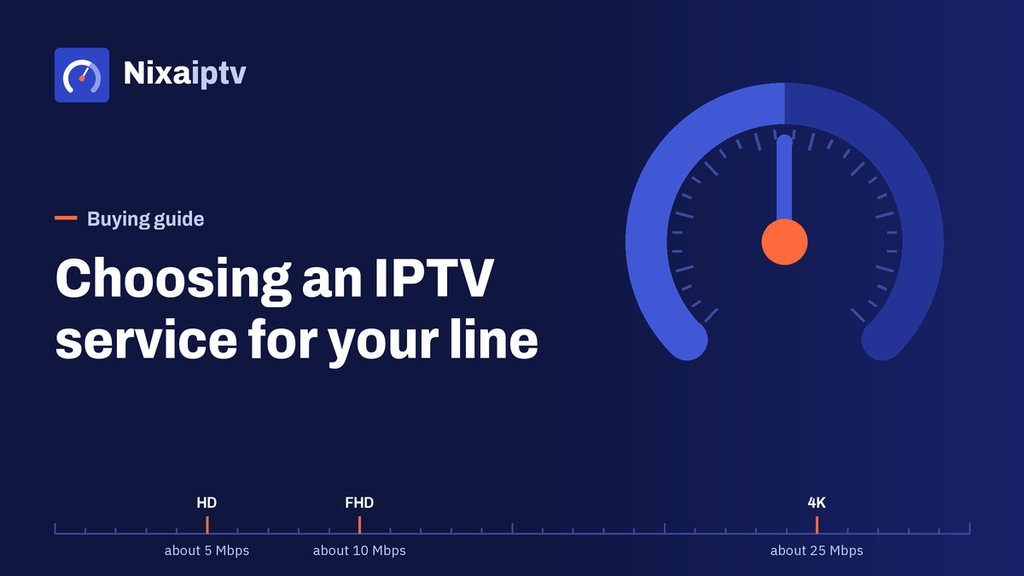
Hold those against the figures one screen needs:
| Quality | Steady speed per screen | Data per hour |
|---|---|---|
| HD (720p) | about 5 Mbps | about 2 GB |
| Full HD (1080p) | about 10 Mbps | about 4.5 GB |
| 4K (2160p) | about 25 Mbps | about 11 GB |
Screens add up, and the rest of the home needs room too: leave roughly half as much again for phones, updates and video calls. A line that holds 22 Mbps therefore carries two HD screens comfortably, or one Full HD screen with space to spare, while two Full HD screens at once want about 30 Mbps. Ping barely matters for watching; speed held steady over several minutes is what counts.
Seven things to check before paying any IPTV service
1. A free trial that runs on your line, at your hour
A demo video or a list of channel names proves nothing about your connection. What you want is a real login, on the device in the room where you watch, during the evening when everyone else in the house is online too. Check that the trial gives you the channels you care about, not just the ones on the front page. Nixaiptv’s trial lasts 24 hours and the login usually arrives within 15 minutes, which leaves time for both a quiet afternoon and a busy evening.
2. Lower-quality copies of the channels you watch
On a line that holds 12 Mbps, a channel offered only in 4K is a channel you cannot watch. Before paying, name the four or five channels that matter in your house and ask whether each exists in Full HD or HD as well as 4K. Then confirm it in the trial. On Nixaiptv many channels are carried in more than one quality, a 4K feed beside an FHD or HD copy of the same channel, which is how a slower line still gets the match or the news.
3. Connections sized to your bandwidth, not to your device count
A connection is one stream playing at a given moment. Plans are sold by connections, so the useful question is how many streams your line can hold together, not how many televisions are in the house.
| Steady line speed | What it carries at once, with headroom | Connections that fit |
|---|---|---|
| about 10 Mbps | One HD screen | 1 |
| about 20 Mbps | One Full HD screen, or two HD | 1 or 2 |
| about 35 Mbps | Two Full HD, or one Full HD and two HD | 2 or 3 |
| about 50 Mbps | Three Full HD, or one 4K and one HD | 2 or 3 |
| about 100 Mbps | Two 4K and one Full HD, or five Full HD | 3 or 5 |
Nixaiptv’s monthly prices are $15, $25, $35 and $49 for one, two, three and five connections. A five-connection plan on a 20 Mbps line pays for streams the line cannot fill; two connections and the right copies will serve that home better and cost $24 a month less.
4. A refund window, and what it covers
A trial tells you whether tonight works. A refund window covers the first week: the weekend with a big match, the evening the whole family is home and every phone is updating. Nixaiptv offers 7 days of money-back, and the terms sit on the refund policy page. Whoever you buy from, read that page before paying, and find out how a refund is requested, since a policy you cannot reach anyone about is worth very little.
5. Support you can reach from the sofa
Problems on an ordinary line tend to appear in the evening, so ask how support is reached and at what hours. Then try it with a question about your line before you pay: “My television measures 14 Mbps at night; which quality should I pick?” A useful answer contains a number. A vague one tells you what help will look like later. Nixaiptv support works through WhatsApp, 24/7.
6. Payment and renewal terms you can state in one sentence
Longer terms cost less per month. A year of Nixaiptv’s single-connection plan paid month by month comes to 12 × $15 = $180; paid as a year, it is $69, which is $111 less. That saving only matters once you know the service works on your line, so start with the trial and a month, and move to a longer term after a full week of real evenings. Ask too whether a plan renews by itself and how you are told before it ends. Nixaiptv terms are paid once for the length you pick and nothing renews automatically; you renew on WhatsApp when the term runs out.
7. The data arithmetic, if your plan has an allowance
Three hours of television a night for 30 nights is 90 hours. At the figures above that comes to:
| Quality | 90 hours a month |
|---|---|
| HD | about 180 GB |
| Full HD | about 405 GB |
| 4K | about 990 GB |
On a 200 GB 5G plan, HD fits and Full HD does not, unless the hours come down. A service that carries HD copies lets you make the allowance last; one that offers only 4K and Full HD leaves you counting gigabytes.
Warning signs on any IPTV offer
- A promise that it never buffers on any connection. Nobody can promise that about a line they do not run.
- “Lifetime” access for one payment. Servers cost money every month; a one-off price has to end somewhere.
- No trial, and a full year demanded up front.
- Quality described only as 4K, with nothing said about lower copies for slower lines.
- Refund terms that exist only in a chat message rather than on a page.
- Nobody answering before you pay. It rarely improves afterwards.
- Boxes sold “fully loaded” with a subscription built in and no one accountable behind it.
- A price that expires in the next hour. Pressure is there to stop you testing.
A 24-hour trial, planned around your line
- When the login arrives, install the player on the device in the room where you watch, not on the laptop beside the router. Our setup guides cover each device.
- During the day, look up your four or five channels, note which copies exist, and add the one your measured speed suits to favorites.
- At your usual viewing hour, run the speed test on the TV device again, then start every screen you normally run at the same time, each on its chosen copy. Leave them playing for 20 minutes.
- Step the main screen up one quality. If it holds, that is your ceiling; if it stalls, step back down. Our 4K page explains when 4K is realistic.
- Send support one question and note how quickly a useful answer comes.
- Next morning, choose the connection count from the table above and buy a month. Longer terms can wait for the second purchase.
How Nixaiptv lines up against the list
The facts, so you can check them against the seven points: 25,000+ channels from 60+ countries and 120,000+ films and series; 4K, FHD and HD, with many channels in more than one quality; a 24-hour free trial; 7 days of money-back; activation in under 15 minutes; support on WhatsApp 24/7; 99.9% uptime on our side. Plans run for one, two, three or five connections, from one month to a year, all listed on the pricing page.
What we cannot change is the speed of your line, the Wi-Fi between your router and your television, or the size of your monthly allowance. Those belong to you and your internet provider. The point of the checklist, and of the free trial, is to learn within a day whether your connection and our service fit together, before any money changes hands.
Follow-up questions on this topic
What makes an IPTV service suit a slow internet connection?
Lower-quality copies of the channels you watch. A Full HD copy needs about 10 Mbps and an HD copy about 5, so a service that carries those beside its 4K feeds can still deliver the channel on a modest line. Check for them during a free trial, on your own line, at the hour you usually watch.
How many connections should I buy?
As many as your line can carry at the same moment, not as many as you have televisions. Add the per-screen figures (about 5 Mbps for HD, 10 for Full HD, 25 for 4K), then keep roughly half as much again free for everything else. A 20 Mbps line rarely needs more than two.
Is a yearly plan worth it?
Once you know the service works on your line, usually yes: Nixaiptv's single-connection year is $69, against $180 for twelve separate months. Before that, no. Use the 24-hour trial and a first month to confirm the evenings are watchable, then take the longer term.
What should I check during a free trial?
A speed test on the TV device at your usual hour, the channels your household actually watches and which quality copies they come in, every screen running together for twenty minutes, and how quickly support gives a useful answer to one question about your line.
What are the warning signs in an IPTV offer?
Promises that it never buffers on any connection, lifetime access for one payment, no trial combined with a full year up front, quality described only as 4K, refund terms that are not written on a page, and pressure to buy within the hour.
Can a provider fix buffering caused by my own Wi-Fi?
No. A provider can offer lower-quality copies and keep its servers out of the way, but the path from your router to your television belongs to your home. A cable, a powerline kit, a mesh unit or moving the router usually fixes Wi-Fi stutter; a different subscription does not.
A plan sized to the line you already have
One screen for a month costs $15. The login reaches you in the WhatsApp chat under 15 minutes after payment, and 7 days of money-back cover the first week on your own connection.
Keep reading
IPTV vocabulary, starting with the words on your internet bill
35 IPTV terms sorted by where they turn up at home: on the internet bill, between router and TV, inside the stream,…
September 19, 2026Cable TV or IPTV: which one suits the internet line in your home
Cable brings its own wire and box; IPTV borrows the broadband you already have. How the two compare on installation, Mbps per…
September 19, 2026IPTV vs OTT streaming: how each one behaves on an ordinary home line
Streaming apps adapt their picture to your line every few seconds; an IPTV channel list plays the fixed copy you pick. What…