
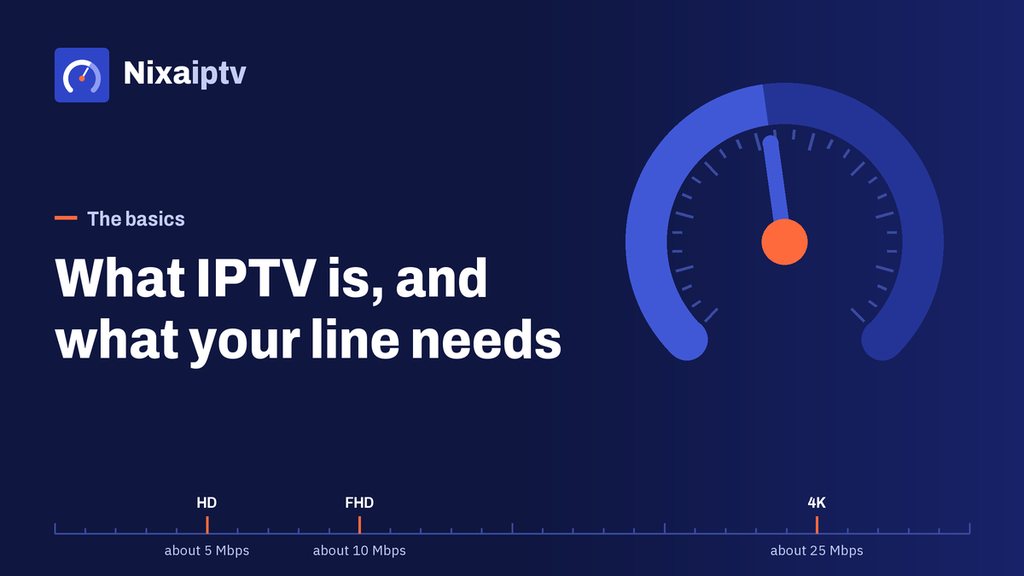
IPTV is live television and on-demand video delivered as ordinary internet data, one stream per screen, over the broadband you already pay for. A television showing a channel in HD asks your line for about 5 Mbps and works through about 2 GB in an hour. Full HD roughly doubles both figures, and 4K needs about 25 Mbps. No dish goes on the wall and no installer comes to the door. Everything else on this page follows that one stream from a server to your sofa, so that you can judge what your own connection will carry before you spend a cent.
Three kinds of traffic, and only one of them is heavy
While a player app is open, three quite different things travel over your line. Two of them are so small that a weak village DSL connection handles them without noticing. The third is the reason Mbps and monthly data allowances come into the conversation at all.
The sign-in: a few kilobytes
The player opens by sending your login to the provider: the server’s address plus your username and password, a trio usually called an Xtream Codes login. The server checks them and answers with the details of your plan, among them how many screens may play at the same moment and the date your term runs out. The whole exchange is smaller than a short email. If it fails, look for a typing slip or a missing port number at the end of the server address; speed is almost never the cause.
The channel list and the guide: megabytes, mostly once
Next the player fetches the list of everything it is allowed to show, then the electronic program guide (EPG) that fills each row with what is on now and later. The catalog behind a Nixaiptv login runs to 25,000+ live channels and 120,000+ films and series, so that list is long, and on a slow line the first load can take a minute or two. It is still measured in megabytes rather than gigabytes, and afterwards the player refreshes it in the background on a schedule you can usually set. A sluggish first load says very little about how the picture will behave.
The picture: the part that fills the pipe
Pick a channel and the server starts sending that channel to your device alone, as an unbroken run of short video segments. This is the heavy traffic, and its size depends almost entirely on the quality you open:
| Quality | Picture size | Steady speed per screen | Data per hour |
|---|---|---|---|
| HD | 720p | about 5 Mbps | about 2 GB |
| Full HD (FHD) | 1080p | about 10 Mbps | about 4.5 GB |
| 4K | 2160p | about 25 Mbps | about 11 GB |
Read those speeds as what one screen has to hold, minute after minute, rather than a peak your line reaches now and then. Many channels in the line-up come in more than one of these qualities at the same time: a 4K feed sits in the list beside an FHD or HD copy of the same broadcast. That is how a slower connection still gets the channel. It opens the lighter copy.
When playback stops, so does the traffic
An aerial or a dish receives every channel around the clock, whether anybody is watching or not. IPTV works the other way round: nothing flows until a device asks for a channel, and the flow ends when playback ends. The one trap on a capped plan is a stick or box that keeps playing after the television itself has been switched off. It downloads exactly as much as it would with an audience, so on a 4G router or a satellite plan with a monthly limit, stop the stream before you reach for the TV’s power button.
Every television asks for its own copy
With cable or satellite, one signal enters the house and each set picks from it. With IPTV, each device that is playing receives a separate stream, even when two rooms are on the same channel. This is why plans are sold by the number of connections (screens playing at the same moment) and why a line has to be sized for the busiest evening of the week rather than a typical one.
| Playing at once | Streams on their own | Line to look for, with room for the rest of the house |
|---|---|---|
| One HD screen | about 5 Mbps | about 8 Mbps |
| One Full HD screen | about 10 Mbps | about 15 Mbps |
| Three HD screens | about 15 Mbps | about 23 Mbps |
| Two Full HD screens | about 20 Mbps | about 30 Mbps |
| One 4K screen | about 25 Mbps | about 38 Mbps |
| One 4K plus one HD | about 30 Mbps | about 45 Mbps |
The third column adds roughly half as much again for everything that shares the line: phones uploading photos, a console fetching an update, a video call in the spare room. None of them waits politely for the film to finish.
Worked example: a village DSL line reading 15 Mbps
Suppose a speed test on the living-room box shows about 15 Mbps on most evenings. That carries one Full HD screen with space left for the household’s phones. Now a second television comes on. Two Full HD streams would want about 20 Mbps before anything else is counted, more than this line has, so one or both pictures would keep pausing. Open the HD copy of each channel instead (about 5 Mbps apiece, about 10 Mbps together) and roughly 5 Mbps stays free for everything else. Nothing about the subscription changes. Only the version each screen opens does.
How the player rides out an uneven connection
Video does not go to the screen the instant it lands. The player holds a small reserve, several seconds of picture fetched ahead of the moment you are watching, and plays from that reserve while topping it up. The reserve is called the buffer.
Home connections are rarely perfectly even. A microwave in the kitchen disturbs 2.4 GHz Wi-Fi, a laptop starts a cloud backup, the line from the exchange dips for a moment. As long as each dip is shorter than the reserve, the screen shows nothing of it. When the line delivers less than the stream needs for longer than the reserve lasts, the reserve empties and the player has to stop and refill it. That pause, with its spinning circle, is what people mean by buffering.
Two practical lessons come out of this. Steadiness counts for more than the headline figure: a line that holds 12 Mbps all evening serves a Full HD screen better than one that leaps to 40 and then sags to 6. And ping (latency), the millisecond figure every speed test shows, barely affects watching. It matters for online games and video calls. A stream with seconds of picture in hand cares about speed sustained over minutes.
Which links in the chain belong to whom
A stream passes through several hands on its way to the screen, and it helps to know who can change each one.
- The provider’s servers. This is our part: enough capacity that the server is not the slowest link, a 99.9% uptime record, and several quality versions of most channels so that there is always a lighter option to open.
- Your internet provider and the line into the home. The speed you are sold, how evenly it holds through the evening, and any monthly data allowance. Only you and that provider can change these.
- The router and where it sits. A router in a hall cupboard two rooms away loses a good share of its Wi-Fi signal through the walls before any of it reaches the television.
- The last stretch to the screen. An Ethernet cable from the router to the TV device is the most dependable link there is. On Wi-Fi, the 5 GHz band is quicker at short range; 2.4 GHz travels further through walls but carries less. A powerline adapter or a mesh unit can bring a good signal to a room the router cannot reach.
- The playing device. It has to decode the stream. Older sticks and televisions handle Full HD easily but can stumble over 4K channels compressed with HEVC (H.265).
On an ordinary home connection, most picture problems are solved in the last three of those, often at little or no cost and without touching your internet plan.
The pieces that sit on your side of the router
Beyond the connection itself, three things turn data into television. Most homes already have the first, the second is free, and the third is the only part you pay for.
| Piece | Typical examples | Worth knowing |
|---|---|---|
| A device that runs a player | Fire TV Stick, Android TV box, Samsung or LG smart TV, Apple TV, MAG or Formuler box, Windows PC, Mac, phone, tablet | The one nearest a cable socket or the router is often the best choice for the main TV |
| A player app | IPTV Smarters Pro, TiviMate, Smart IPTV | Ships empty; it shows no channels until a login goes in |
| A login | Xtream Codes (server, username, password) or a single M3U link | Treat either one like a password; whoever holds it can use your plan |
A login usually arrives in under 15 minutes after ordering on WhatsApp. There is a walkthrough for every device in the setup section, and the IPTV glossary explains every term on the setup screens, starting with the ones about your connection.
How it compares with an aerial, a dish, cable and a streaming app
| Aerial or dish | Cable | Streaming app | IPTV | |
|---|---|---|---|---|
| Carried by | Radio signal from a mast or satellite | A coax line from the street | Your broadband | Your broadband |
| Counts toward a data allowance | No | No | Yes | Yes |
| Live channels | Whatever reaches your area | The tier you pay for | Mostly a library; live channels vary by app | 25,000+ from 60+ countries |
| A second room needs | Another tuner or receiver | Another box | The app on that device | A spare connection on your plan |
| If the internet drops | Keeps playing | Usually keeps playing | Stops | Stops |
The second row is the one that matters most here. IPTV and streaming apps share a pipe with everything else in the house, so the connection becomes part of the product in a way it never is for an aerial. The longer comparison is in cable TV or IPTV, and on-demand apps get their own page in IPTV and OTT streaming.
Checking your own line before you pay
- Measure on the playing device. Use a speed-test app or the browser on the stick, box or television itself, not a phone held next to the router. The phone is usually closer to the router and on a better band; the TV device is the one that has to hold the stream.
- Measure at the hour you actually watch. A line tested at eleven in the morning is not the line you will be using after dinner. Take two or three readings and keep the lowest.
- Divide by 1.5. What is left is the budget for television once the rest of the house has its share. About 5 Mbps of budget per HD screen, about 10 per Full HD screen, about 25 per 4K screen.
- Run the 24-hour free trial on that device, at that hour, with every screen that normally plays at the same time.
- Before judging, step down once. If a channel stalls, open its FHD or HD copy, and move the box onto Ethernet or the 5 GHz band if the router is close enough.
The cheapest paid option is a single month on one screen for $15; every term and tier is listed on the pricing page, and a 7-day money-back period covers the first week if your line turns out differently on an ordinary evening. Support answers on WhatsApp 24/7, including questions about what your speed-test result means.
Where the legal question fits
IPTV names a way of delivering video, the same internet protocol that telecom companies use for their own TV packages and hotels use for in-room television. The term says nothing about who holds the rights to any particular channel. That depends on the service and on where you live, and it is covered properly on its own page: is IPTV legal.
Follow-up questions on this topic
Does IPTV use data when nobody is watching?
Only if a player is still running. IPTV sends a stream only when a device asks for one, so a closed app uses nothing beyond occasional guide refreshes measured in megabytes. A stick or box left playing behind a switched-off television keeps downloading at full rate, about 4.5 GB an hour in Full HD, so on a capped plan stop playback before turning the TV off.
Is a 10 Mbps connection enough for IPTV?
For one screen, usually yes. A steady 10 Mbps carries one HD stream (about 5 Mbps) with room to spare, or one Full HD stream (about 10 Mbps) when little else is using the line. It will not hold two Full HD screens at once, or 4K. The 24-hour trial, run on the TV device at your usual viewing time, shows which quality your line keeps up with.
Can IPTV run on a 4G or 5G home router?
Yes. A mobile home router carries IPTV like any other broadband connection, and its speed depends on the signal where it sits, so a spot near a window often helps. The figure to check is the data allowance: two hours a day of Full HD comes to roughly 270 GB over a 30-day month, against roughly 120 GB for the same viewing in HD.
Why is the first sign-in slower than changing channels later?
The first sign-in downloads the whole channel list and program guide, which for 25,000+ channels and 120,000+ films and series takes a while on a slow line, sometimes a minute or two. After that the player keeps the list and refreshes it in the background, and changing channels only means starting a new stream, which takes a few seconds.
Do I need a separate internet line for IPTV?
No. IPTV uses the broadband you already have, through the same router as everything else in the house. What needs planning is capacity: each screen playing takes its own share, about 5 Mbps in HD or about 10 Mbps in Full HD, and the rest of the household needs roughly half as much again on top.
Does IPTV work over satellite internet such as Starlink?
Yes, if the speed holds steady. A satellite connection that keeps about 10 Mbps through the evening carries a Full HD stream, and its higher latency does not matter for watching because the player holds several seconds of picture in reserve. Check whether the plan has a data allowance or a priority-data limit, then use the per-hour figures to estimate a month of viewing.
A plan sized to the line you already have
One screen for a month costs $15. The login reaches you in the WhatsApp chat under 15 minutes after payment, and 7 days of money-back cover the first week on your own connection.
Keep reading
IPTV vocabulary, starting with the words on your internet bill
35 IPTV terms sorted by where they turn up at home: on the internet bill, between router and TV, inside the stream,…
September 19, 2026Cable TV or IPTV: which one suits the internet line in your home
Cable brings its own wire and box; IPTV borrows the broadband you already have. How the two compare on installation, Mbps per…
September 19, 2026IPTV vs OTT streaming: how each one behaves on an ordinary home line
Streaming apps adapt their picture to your line every few seconds; an IPTV channel list plays the fixed copy you pick. What…